Fixing Shopify Bundle SKUs Without Spreadsheet Chaos
When your store sells bundles — gift sets, multipacks, curated boxes — inventory tracking breaks. Why spreadsheets make it worse, and the fix.
The Problem
You sell a “Gift Box” that contains 1 candle, 1 soap bar, and 1 lip balm. Each of those components is also sold individually. When a Gift Box sells, you need to deduct 1 unit from three different inventory counts — but Shopify only tracks inventory at the SKU level, not the component level.
So someone on your team opens a spreadsheet.
Every time a bundle order comes in, they manually subtract the components. Every time new stock arrives, they update the sheet. Every time someone forgets to update, the numbers drift. A month later, the spreadsheet says you have 40 candles in stock. The shelf says 12. The customer who ordered a Gift Box gets an email saying the candle is out of stock — three days after purchase.
This is the bundle inventory problem, and it is the single most common inventory headache I hear from Shopify merchants who sell kits, sets, or curated boxes.
Why Spreadsheets Make It Worse
The spreadsheet feels like a solution because it is visible and familiar. But it introduces three failure modes that compound over time:
1. Lag between sale and deduction
Someone has to notice the order, open the sheet, and update the numbers. If your store processes 30 orders a day and 8 of them are bundles, that is 24 manual cell edits — every day. Miss one, and the error propagates: the next bundle order may oversell a component that the sheet still thinks is in stock.
2. No atomic transactions
A bundle deduction touches three inventory counts. In a spreadsheet, those are three independent edits. If the person updating gets interrupted after editing the candle count but before editing the soap count, the data is now inconsistent — and nobody will notice until a customer complains.
3. No audit trail
Who changed the candle count from 40 to 12? When? Why? In a shared Google Sheet, the answer is usually “I don’t know.” Version history exists, but nobody checks it until the discrepancy is already costing money.
The result: inventory drift. Your spreadsheet and your actual stock slowly diverge until the gap is large enough to cause oversells, stockouts, or both.
What Shopify Does (and Does Not) Do
Shopify tracks inventory per inventory_item. Each variant of each product has one. When an order ships, Shopify decrements the inventory_item for that variant. This works perfectly for individual products.
For bundles, Shopify offers two approaches:
| Approach | How it works | Limitation |
|---|---|---|
| Shopify Bundles app (free, first-party) | Creates a bundle product whose components are linked; for fixed bundles and multipacks, Shopify automatically adjusts component inventory as bundle orders sell. | Works for fixed bundles only — no dynamic/mix-and-match bundles, no custom deduction logic, and no audit trail of the adjustments your workflow can control. |
| Third-party bundle apps ($15–49/mo) | Some apps listen for bundle orders and adjust component inventory via the Admin API. | Each app implements its own logic. Some are slow. Some break on partial refunds. You are locked into their pricing. |
The gap: for fixed bundles the first-party app covers the basics, but you don’t get a transparent, auditable component-deduction system you own — one that handles dynamic bundles, partial refunds, and your own business rules.
The Pattern: Webhook-Driven Component Deduction
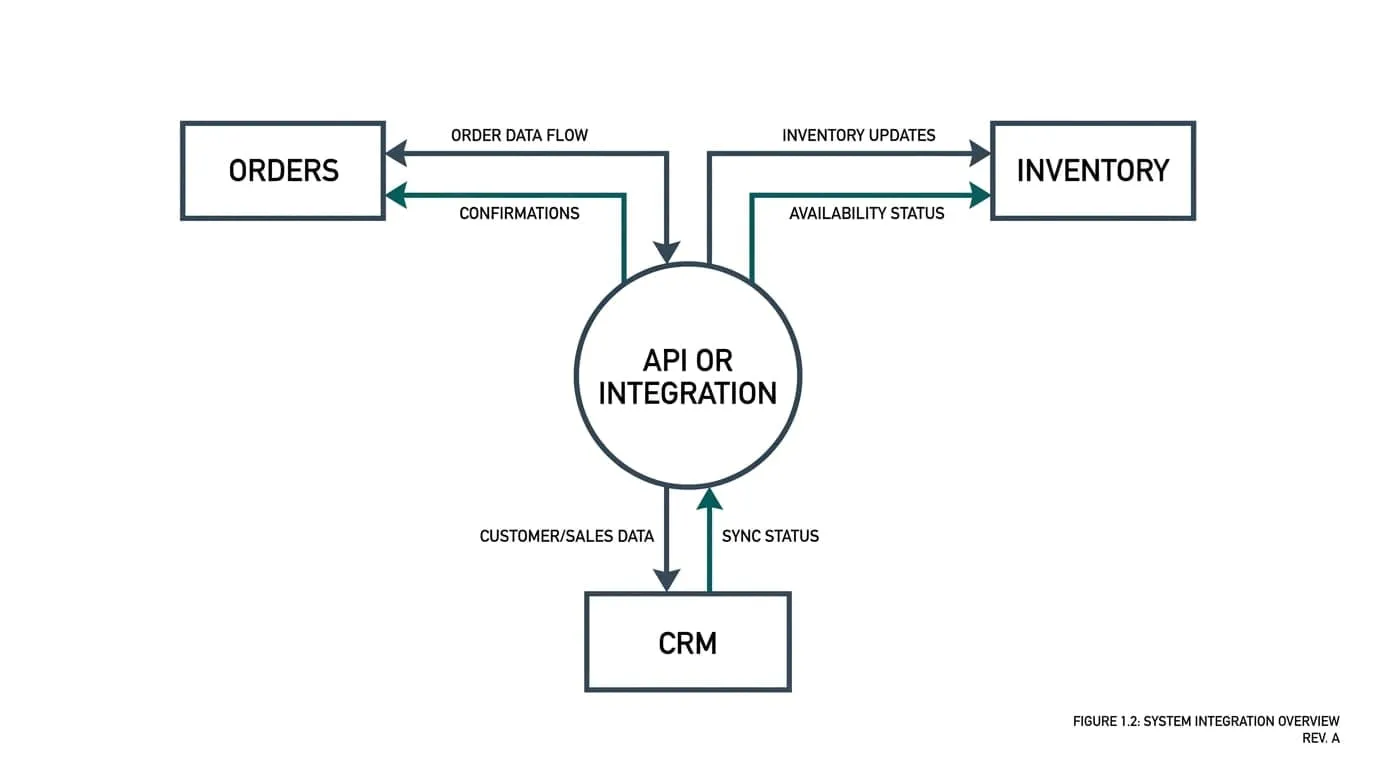
The fix is a small automation that listens for bundle orders and adjusts component inventory through the Shopify Admin API. No spreadsheet. No manual edits. No per-app subscription.
Bundle order placed
        ↓
Shopify orders/paid webhook fires
        ↓
Your server reads the bundle's component list
        ↓
For each component: POST /inventory_levels/adjust
   { available_adjustment: -1 × bundle_qty }
        ↓
Shopify inventory is now correct
        ↓
Log the adjustment (who, when, which components)
The key API call is POST /admin/api/2024-10/inventory_levels/adjust.json:
{
  "location_id": 655441491,
  "inventory_item_id": 808950810,
  "available_adjustment": -2
}
This is an atomic adjustment — Shopify applies it in a single transaction. If the candle has 5 units available and you adjust by -2, it becomes 3. No intermediate state. No partial updates.
What happens on a return or refund?
The same pattern in reverse: listen for the refunds/create webhook, read which items were returned, and adjust component inventory back up. The audit log records both directions.
What about partial bundles?
If a customer orders 2 Gift Boxes, the adjustment is -2 per component. The math is simple: bundle_qty × component_qty_per_bundle. The webhook payload contains the line item quantity — no guessing.
The Cost Comparison
| Approach | Monthly cost | Who maintains it | Audit trail |
|---|---|---|---|
| Spreadsheet | $0 (but 30–60 min/day of staff time) | Your team, manually | None |
| Third-party bundle app | $15–49/mo | The app vendor | App-dependent |
| Custom webhook automation | ~$20/mo (VPS hosting) | Your developer, once | Full — every adjustment logged |
The custom approach’s monthly cost is just hosting — the same server that handles your other Shopify webhooks. The one-time build cost is typically 4–8 hours of development.
What This Looks Like in Practice
An illustrative example (not a client result) — a store selling 15 bundle SKUs across 3 locations, processing 80 orders/day:
- Before: Staff spends 45 minutes/day updating the inventory spreadsheet. Monthly oversell: a handful of orders. Customer complaints about “in stock” items that aren’t.
- After: Bundle orders automatically deduct components within seconds of payment. Zero manual updates. Oversell rate drops to near zero (limited only by Shopify’s own inventory sync, which is near real-time).
The automation handles 60–100 bundle orders/day without human intervention. The audit log records every adjustment with a timestamp, order reference, and component details.
When You Need More Than Component Deduction
Component deduction solves the immediate problem. But if your store is growing, you will eventually hit the next layer:
- Reorder alerts: When a component drops below a threshold, notify the purchasing team.
- Multi-location bundles: The Gift Box ships from Location A, but the candles are at Location B. The automation needs to check which location has stock before deducting.
- Dynamic bundles: The customer picks 3 items from a list of 10. The component list is not fixed — it is determined at checkout.
Each of these is a straightforward extension of the same pattern. The webhook fires, your server reads the order, applies the business logic, and adjusts inventory. The API does not change — only the logic between the webhook and the API call grows.
Summary
| Concern | Spreadsheet | Automated |
|---|---|---|
| Deduction speed | Minutes to hours | < 2 seconds |
| Atomic updates | No | Yes |
| Audit trail | None | Full |
| Monthly cost | Staff time | $0 |
| Handles returns | Manual | Automatic |
| Scales to 100+ orders/day | Breaks | Built for it |
If your store sells bundles and your team is still updating a spreadsheet after every order, the fix is a one-time build — not another monthly subscription.
This article is part of the Shopify automation series. If you are running into bundle inventory issues, book a 20-minute fit call — I will look at your setup and tell you whether automation is the right fix. For the broader question of when spreadsheet inventory fails wholesale, see Your Inventory Spreadsheet Will Break at 10k SKUs.