When Zapier Costs More Than Writing the Integration
The break-even math that tells you when a Zapier bill has grown past the cost of owning the integration — and what actually replaces it.
TL;DR
| The problem | Zapier bills that started at $20/mo quietly climb into the hundreds as task volume grows — because every step in a Zap eats tasks. |
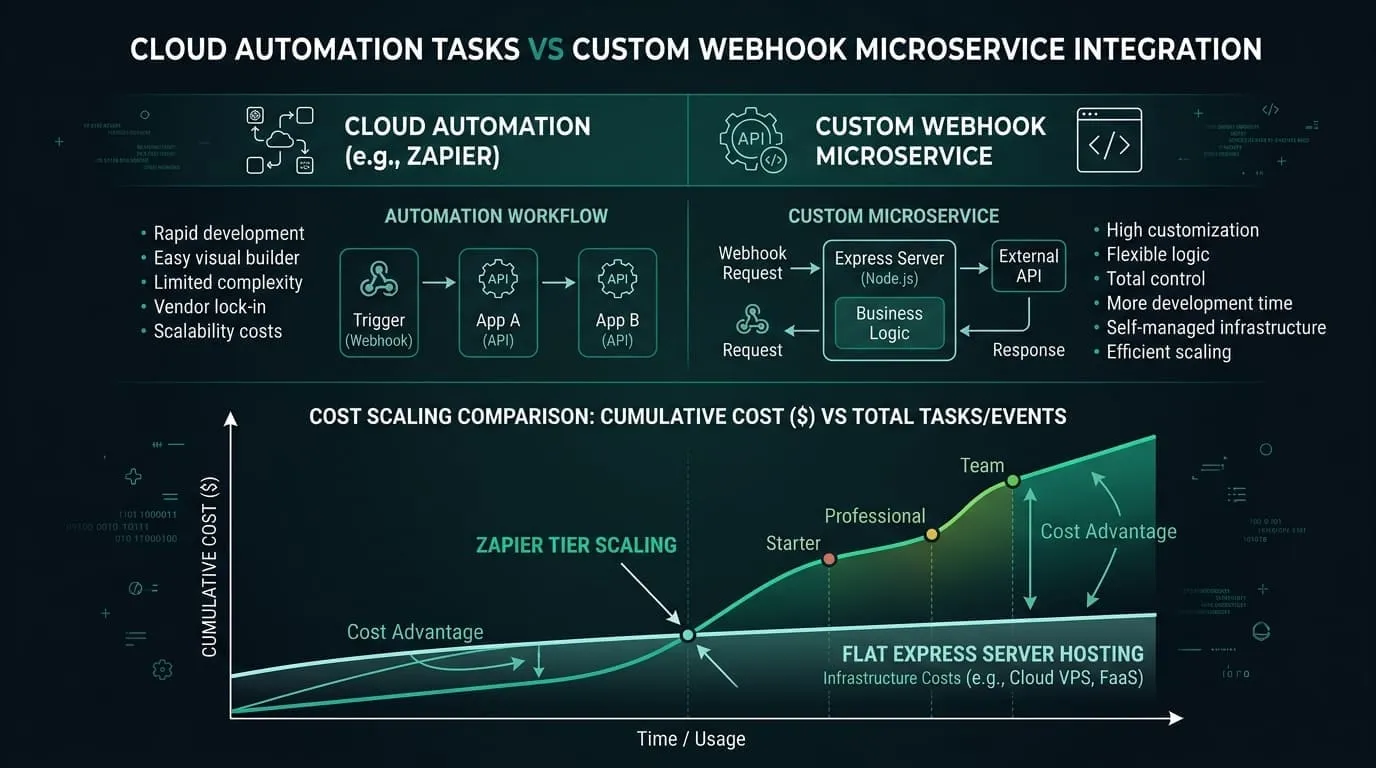
| The cost mechanic | A 5-step Zap run 6,000 times/mo = ~30,000 tasks. Multi-step Zaps × volume = the tier ladder. |
| The break-even rule | Once your Zapier spend clears the all-in monthly cost of a custom integration, you’re paying rent instead of building equity. |
| Worked example | A Shopify-order Zap replaced by one owned integration: ~$4k one-time build + |
| The pattern | One small service you own receives each order, checks it, files it in your database, and notifies the team. Five Zap steps become one connection you own. |
| Key takeaway | Keep Zapier for breadth and experiments; migrate the 2–3 high-volume Zaps that drive most of your bill. |
You’ll learn how Zapier’s task-based billing actually scales, a break-even formula you can run on your own invoice in two minutes, when it pays to keep paying versus own the integration, and what the replacement for a typical multi-step Zap actually looks like. The worked example is a Shopify order Zap — for the broader picture of what else to automate on a store, see Shopify Automation: Three Integrations Every Store Needs.
The Problem
Zapier is a brilliant way to start automating. You connect two apps, click a few steps, and things move. For the first dozen Zaps at low volume, the bill is small and the value is obvious. This is why teams adopt it: the time-to-first- automation is measured in minutes.
The problem arrives later, quietly. The bill doesn’t scale with how clever your automation is — it scales with how many times each step runs. A Zap that saved you hours at 50 runs/month becomes your largest SaaS line item at 5,000 runs/month, and there is no “power” tier that makes the marginal cost cheap again. You’re paying per step, forever, and the more successful the automation, the more it costs.
This is the point where most teams ask the question this article answers: at what monthly bill does it become cheaper to just write the integration?
How Zapier Counts What You Pay
Zapier’s pricing is task-based. The key facts (all verifiable on their pricing page, as of July 2026):
- Plans start at Free ($0, 100 tasks/mo, two-step Zaps), Professional (from $19.99/mo — multi-step Zaps, webhooks), and Team (from $69/mo), then Enterprise.
- Every step in a Zap consumes tasks — trigger, actions, filters, paths. A multi-step Zap is not “one task per run”; it’s “one task per step per run.”
- Task tiers climb a ladder: 100 → 750 → 1.5K → 2K → 5K → 10K → 20K → 50K → 100K → … → 2M. The monthly price rises with the tier you select (annual billing saves ~33%).
- AI steps, code steps, and SDK calls all draw from the same task pool, and some step types cost more than one task each.
The multiplier that surprises people is the second bullet. Consider a typical e-commerce automation:
Trigger:  New paid order in Shopify          (1 task)
Action 1: Create/update customer in CRM      (1 task)
Action 2: Create order/deal in CRM           (1 task)
Action 3: Post a notification to Slack       (1 task)
Action 4: Append a row to a reporting sheet  (1 task)
                                    total:   5 tasks per run
A five-step Zap run 6,000 times a month — entirely normal for a mid-size Shopify store — is ~30,000 tasks/month. That volume pushes you well up the tier ladder, and the bill follows.
This is the mechanical reason Zapier bills creep: volume × steps = tasks, and tasks are what you pay for.
The Break-Even Math
The decision is simpler than vendors make it sound. A custom integration has two costs: a one-time build (amortized over its useful life) and a small monthly hosting cost. Zapier is a perpetual monthly cost. Break-even is the point where the perpetual rent exceeds the amortized build.
Custom all-in (monthly) = (build cost ÷ amortization months) + hosting
Switch when:  Zapier monthly  >  Custom all-in (monthly)
Try Your Own Numbers
Interactive Zapier vs Custom Webhook Calculator
Calculate your exact break-even point based on monthly runs and step count.
A worked example
Say you replace the five-step Shopify Zap above with one small integration you own. The work is genuinely small — a secure receiver for order notifications, strict data checks, writing each order to your database exactly once, and a Slack message. For an experienced developer that’s a few focused days.
| Cost component | Representative figure |
|---|---|
| One-time build (a few days of dev) | ~$3,000–$5,000 (use $4,000 as midpoint) |
| Monthly hosting (small VPS / Workers) | ~$20 |
| Amortization window | 24 months |
All-in monthly cost of the custom integration over 24 months:
$4,000 ÷ 24 + $20 = ~$167 + $20 = ~$187/monthSo break-even is ~$190/mo of Zapier spend. Below that, Zapier’s convenience is worth the rent. Above it, every additional month widens the gap:
| Your Zapier bill | Custom all-in (24-mo) | Cheaper option | Net over 12 months |
|---|---|---|---|
| $50/mo | ~$187 | Keep Zapier | Zapier saves ~$1,640 |
| $100/mo | ~$187 | Keep Zapier | Zapier saves ~$1,040 |
| ~$190/mo | ~$187 | Break-even | — |
| $300/mo | ~$187 | Write it | Custom saves ~$1,350 |
| $500/mo | ~$187 | Write it | Custom saves ~$3,750 |
| $800/mo | ~$187 | Write it | Custom saves ~$7,350 |
And after month 24 the build is a sunk cost — the custom integration drops to ~$20/mo while the Zapier bill keeps scaling with your growth. The longer you run it, the wider the gap gets.
[!TIP] Plug your own numbers into the interactive calculator above: take your current Zapier invoice, the cost of a few days of development, and ~$20/mo hosting. The crossover is almost always lower than people expect. Confirm current tier prices on Zapier’s pricing page.
When to Keep Paying vs When to Write
Cost is necessary but not sufficient. The real decision has three inputs:
| Factor | Lean toward Zapier | Lean toward writing it |
|---|---|---|
| Monthly cost | Below your break-even (~$190 in the example) | Above break-even, and growing |
| Volume | Low / sporadic runs | Thousands of runs/month |
| Step count | 1–2 steps per Zap | 4+ steps (the task multiplier bites) |
| Change frequency | You tweak it often; logic is experimental | Stable logic, rarely changed |
| Who maintains it | No developer available | You have (or can hire) a developer |
| Integrations needed | Many apps, each lightly used | 2–3 apps, heavily and critically |
The pattern almost everyone converges on: keep Zapier for breadth and experiments, migrate the 2–3 high-volume Zaps that drive most of the bill. You don’t have to choose one or the other — you optimize the expensive tail and leave the cheap long tail alone.
What Replaces the Zap
The entire five-step Zap becomes one small service you own. It receives each order event once and does the same things the Zap did — without the per-task meter:
- Receive. One secure entry point for order notifications — no task charged.
- Check. Data is validated on arrival; junk is rejected at the door.
- Filter. Only paid orders continue; the rest are logged and skipped.
- File. Customer and order land in your database exactly once — a repeated notification can never create a duplicate (a class of silent bug that’s painful to prevent in Zapier).
- Notify. The team gets one Slack message — no per-task charge.
The last Zap step — “append a row to a reporting sheet” — disappears entirely: reporting becomes a query over the orders you already stored, always consistent, no extra write per run.
[!NOTE] What’s under the hood For the technical reader: this is a single typed webhook handler — roughly 30 lines of TypeScript with strict schema validation, a write-once database upsert, and one Slack call. It’s the pattern I use for almost every Zapier exit, and it responds in well under a second.
What changed beyond the price:
- No per-task cost. 6,000 orders or 60,000, the hosting bill is flat.
- Duplicate protection is yours. A repeated notification can’t double-create an order.
- Reporting is free. “Append a row to a sheet” becomes a query over the orders you already store — no extra task per run.
- Visibility is yours. Logs, error alerts, retries, metrics — you control them, instead of hoping a Zap’s history is enough.
What You Give Up, What You Gain
You give up Zapier’s editor. Building a Zap in a browser is faster than writing a webhook, and changing one doesn’t require a deploy. For exploratory automation or apps you touch lightly, that speed is worth real money — which is exactly why the “keep Zapier for the long tail” rule above exists.
You gain control and a cost curve that flattens. No per-step economics, no tier cliffs, no surprise overage bills when traffic spikes on Black Friday. The integration becomes an asset you own, not a recurring liability that scales with your success.
FAQ
Isn’t Zapier cheaper because there’s no developer time? For low-volume automation, yes — that’s the whole point of the break-even line. The error is assuming it’s always cheaper; above break-even, the developer time amortizes to less than the recurring bill, and then keeps saving every month after.
What about Make.com or n8n — aren’t they cheaper? They’re often cheaper per task, and n8n is self-hostable. They shift the curve but don’t change the shape: no-code/low-code tools that bill by volume all hit the same wall at scale. The break-even math is identical; only the crossover number moves.
We don’t have a developer. Is this article telling us to leave Zapier? No — it’s telling you to migrate the small number of Zaps that drive most of your bill, and only when their cost clears break-even. If you have no developer, the “keep paying” column is the honest answer for now, and the right moment to revisit is when a single Zap’s monthly cost would fund the build.
Doesn’t a custom integration break more often? It can — if it’s poorly built. But a purpose-built connection with validation, duplicate protection, and logging is generally more reliable than a multi-step Zap, because you control retries and error handling instead of relying on a step silently failing somewhere in the middle of a chain.
Want help migrating your expensive Zaps?
If two or three Zaps are driving most of your Zapier bill, they’re almost certainly past break-even — and replacing them is a focused, low-risk project. I scope the exit in a single call: which Zaps to migrate, what the target looks like, and a firm estimate. You keep the automation; you stop renting it.
Looking for the full Shopify automation picture? See the related Shopify articles and the live automation dashboard.